aGis – an information system for places of history
This page was translated from German with the help of AI and has not yet been reviewed.
aGis is an information system for places of history: monuments, memorial plaques, graves, camps, historic sites and buildings that no longer exist. For each place, aGis records how it changed over time, which people are connected with it, which sources document it and what it looks like on the ground today.
aGis is meant for memorial sites, archives, museums and associations, referred to below simply as institutions, and for everyone researching contemporary, regional or family history. An institution needs no technical infrastructure of its own, only a web browser. Once reviewed, what it contributes appears on permanent web pages, at the place itself through a QR sign and, if desired, on the institution's own website.

What kind of system is aGis?
aGis is best described as a place-centred historical information system. It brings together what otherwise lives in separate tools:
- a historical map with a timeline,
- a register of people with their life events and relationships,
- registers of documents, books, sources and images,
- separate curation of the collections of several institutions,
- an editorial team that reviews and releases,
- and publication on the web, at the place itself and in scholarly formats.
The place is always at the centre. People, events and documents are attached to places or lead to them.
The Point of History: a place and its history
Every place in aGis is a Point of History, or PoH for short. It carries a permanent number that never changes and is never reassigned. The permanent page of the place, the QR sign at the place and every citation refer to this number.
A place is rarely the same at all times. A monument is erected, removed and set up again elsewhere. A camp becomes an industrial estate and later a memorial site. aGis represents this in phases. Each phase has its own period, its own text, its own location and its own images. One phase represents the place on the map. On request, the map shows all phases.
History is often uncertain, and aGis does not force it into false precision:
- Dates may be vague: no earlier than, no later than, "around 1920" or unknown.
- Where sources contradict each other, phases may overlap. Each phase states how certain its information is.
- If the location is unknown, the place still remains in the holdings, with a description or an address. No coordinate is invented.
- The country of a place follows its location, not the origin of the collection.
- Memorials that do not, or no longer, stand at the place, such as destroyed monuments or deliberately digital ones, are marked as such.
- Places can be linked into structures, such as a camp complex with its subcamps. A car park, a stop or an information board can be attached to a place as access points.

Places, people, events and what connects them
People and organisations. aGis keeps a register of people and organisations. A person's entry includes life events with date and place, relationships with other people and organisations, tags and, where available, a link to the Integrated Authority File (GND). The search also finds names in variant spellings and by how they sound. People recorded twice are merged without any information being lost.
People at a place. A memorial names people, and these people lead to further places, for example to the camp to which they were deported. aGis records both directions.
Events. Events are kept as entries of their own and linked to the places where they happened.
Documents and inscriptions. Archival documents are recorded with shelf mark, access rule and citability. Text recognition makes scanned pages searchable. Inscriptions are transcribed on the photograph, with a reading quality from 1 to 5. aGis proposes the names on a monument as people, following fixed rules. Monuments to several wars can be divided into sections.
Books, sources and evidence. A register of books, plus evidence and footnotes in the text. Cited web pages are archived so that a reference does not vanish when the page goes offline.
Images and sound. A media library records the author, licence and place of capture of each image, along with a description for people who cannot see it. Author and licence are also written into the image file itself. An audio guide in several languages can be attached to a place.
Evaluations: how certain, how visible, how accessible
aGis evaluates two things separately.
First, the information itself. Each phase carries an information certainty from 1 to 5. This keeps it clear whether a statement is well documented or rests on a single indication.
Second, the place as it appears today. Its visibility on the ground, its accessibility, the information on site and the context on site are each rated from 1 to 5. These evaluations are dated. If a place is evaluated again later, the earlier evaluation is kept and the change becomes visible.
In the Workbench you can filter by evaluations, for example all places with an accessibility of 2 or less. Evaluations describe the place. They do not control who may see it.
Three workspaces: Viewer, Editor, Ops
aGis consists of three applications that run in the browser. They work on the same holdings, each with its own purpose.
| Application | For whom | What for |
|---|---|---|
| Viewer | everyone, even without signing in | map, Workbench, search, analytics, statistics and help. Signed-in users propose additions and report field observations. |
| Editor | contributors and the editorial team | editing places, people, events, documents, books and images; reviewing, accepting and releasing contributions; plus tickets, audio guide and reference data. |
| Ops | administration | accounts and roles, groups for collections, background services and their schedules, connections to AI services, audit logs. |
The search finds places, people, images and documents, also by tags, by the number of a place and by variant spellings of a name. Proposals are drafted in a separate working document, which can be continued without a network connection, and are then sent to the editorial team.
In addition there is a mobile app for recording in the field, currently in beta, and a separate, streamlined interface for archival documents. An institution can also be given a view of its own that shows only its collections.
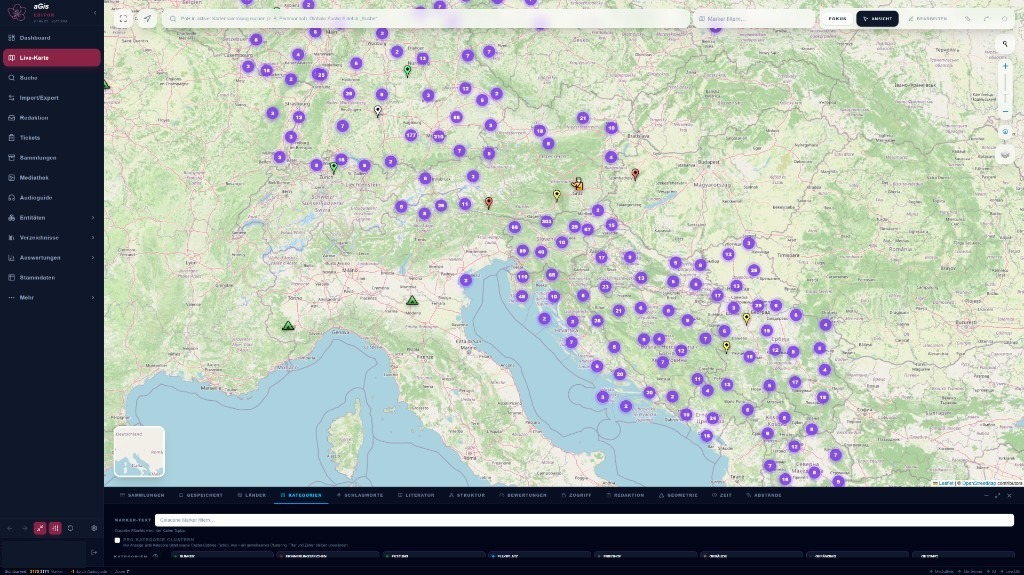
The Workbench: narrowing down the holdings
The Workbench sits below the map. It narrows down what the map shows. All filters work together: if you choose a country, a category and a period, you see only the places that meet all three conditions.
- Collections: which collections are on the map, including several at once.
- Saved: save a selection of filters, apply it again later and share it with others.
- Countries, Categories, Tags and Literature: for example only the places mentioned in a particular book.
- Structure: highlight the places that belong to one site or complex.
- Evaluations: by certainty, visibility, accessibility and information on site.
- Access: for authorised users, also show places that are visible only after signing in or are private.
- Geometry: adjust how points, lines and areas are displayed.
- Time: a period on a timeline, either only the representative phase or all phases.
- Distances: find places that lie very close to each other, for example to spot duplicates.
The Editor adds a tab for the editorial status.
The X-ray view additionally shows, within a section of the map, the places of all other collections. You can see what other institutions have recorded at the same spot without giving up your own selection.
Whatever the map currently shows can be exported as a KML file for geographic information systems. The map offers several base maps, and the places of a category can be grouped into clusters if desired.
Analytics: making patterns in the holdings visible
The analytics show the holdings as a whole, regardless of what is currently selected on the map. They draw on everything the person in question is allowed to see and are open to guests as well.
- Distribution: where places cluster, as a heat map or with symbols.
- Fate paths: arcs from the memorial of a person to the place to which that person was deported. Further kinds can be added: justice, euthanasia, death march, massacre and battle.
- Life paths: the stations of a biography as a line, person by person, in chronological order.
- Relationship network: who is connected with a person, and through which steps two people are linked.
- Statistics: rankings of destinations and flow diagrams from origin to destination.
A country frame crops the map to selected countries or draws only their outline. Fate paths and life paths can also be shown as a layer on the Live Map.
Collections: kept separately, used together
Each institution contributes its holdings as a collection of its own. This collection stays exactly as the institution contributed it. Only the institution itself may change it, and it can be exported again in full at any time.
The editorial team links the places of the collections to avArc's shared core collection. If two institutions describe the same place, the entries are merged without anything being lost. Each collection keeps its own version of the place, and the editorial team decides which version appears publicly. On an opened place you can switch between the public version, all versions and the version of one particular collection.
The number of a merged entry is never reassigned. The old page and the old QR sign forward to the shared place. Conversely, an entry that in fact describes two places can be split.
Curators who look after several collections can be grouped together and given joint access.

Editorial review: checking before anything becomes public
Nothing enters the public holdings unreviewed. Proposals from the Viewer, recordings made with the mobile app, field observations and imports first land in an import batch. There the editorial team reviews the content, runs a dry run to see what would change, and then accepts or rejects the contribution. The Viewer never writes directly into the holdings.
Whether a place is visible, and to whom, is governed by three switches:
- Editorial status: internal, needs work or OK. Internal places are seen only by the editorial team and by the institution that owns the entry.
- Access level: public, signed-in only or private.
- Release in the core collection: published or withheld. This is decided by whoever looks after the core collection.
A place is public only when all three switches allow it. This applies equally to the map, the search, the permanent pages and every export.

Six languages, and where each text comes from
aGis works in German, English, Slovenian, Italian, Spanish and Dutch. The language of the interface and the language of the content can be chosen separately. Someone using the interface in German can read the texts in Slovenian.
Every text knows where it comes from. The original is marked as such. Translations are produced in the background and carry the note "Translation · AI" on the permanent pages. Once the editorial team accepts or improves a translation, it is protected and no later run will overwrite it. Names of places and people are not translated.
If a text is missing in the requested language, aGis shows the next best version: first a related neighbouring language, then English, then German, then any language available.

Permanent pages for places and people
For every released place, and for people with sufficient information, aGis generates a permanent web page in each language. These pages are complete, self-contained web pages. They remain readable and citable even while work is being done on the system itself, and their address follows the permanent number.
The page of a place shows its texts and images with credits, the evidence and the log of field observations. The page of a person shows their biography and a map of their life path.
At the place itself, a QR sign leads to the permanent page. aGis manages these signs: which ones exist at a place, where they hang and which information boards belong to them.
Each page also carries a machine-readable description following the schema.org standard, which search engines and knowledge graphs understand.
Automatically generated biographies
For many of the people a place commemorates, there is only scattered information: a date of birth, a deportation, a name on a stone. The automatic biography turns this into a readable text. It uses the life events, the closest relatives and the place of remembrance and writes sentences from fixed templates in each language. It uses only information that is in the holdings. Relationships appear publicly only if they are documented.
The automatic biography never overwrites what a person has written or marked as protected. A new run replaces only its own texts. A further service can add missing dates of birth and death from the GND, but only as a proposal on which the editorial team decides.
Once a person meets the minimum information, which includes at least a first and a last name, they receive a permanent page of their own in each language, with their biography and a map of their life path. The editorial team can also publish a page explicitly. In the Editor, a single button does it: "Generate biography".

Field observations: what you see on site
Places change. Anyone who is signed in and standing at the place, within about fifty metres, can report whether the place still exists, whether it is accessible and what has changed. This works in the Viewer, in the mobile app and on the permanent page of the place. Photos and a suggested evaluation can be attached.
Every observation goes to the editorial team. The permanent page shows a log of observations, and your own profile lists your visits and observations. In this way many individual visits add up to a continuing record of the state of a place.
Tasks and tickets
Holdings of this size need care. The editorial team uses tickets in the Editor for this. A ticket can refer to a place, a person or a collection, or be a general task. It is assigned to a person or a group, has a status and a progress value, collects comments and keeps a history. Anyone watching a ticket receives an e-mail when it changes. Tickets can be grouped into projects, for example for a recording campaign. A place with open tasks carries a marker.
Formats and interfaces
aGis exports its content in formats used by archives, libraries and research, and imports data from such formats.
| Format | Purpose |
|---|---|
| TEI P5 | scholarly text encoding: export of individual places and archival documents, import of data from partner projects |
| OAI-PMH with Dublin Core | harvesting of metadata by partner institutions, after authentication |
| schema.org | machine-readable description on every permanent page |
| KML and KMZ | export and import of map data for geographic information systems |
| GPX | import of routes and points from GPS devices as suggested locations |
| JSON and CSV | complete export of a collection for the institution that owns it |
| GND, Open Library, Crossref | matching people and literature against authority files and catalogues |
In preparation: TEI via OAI-PMH, LIDO for museum objects, METS, EAD for archival finding aids, CIDOC CRM for linked data and IIIF for images.
For your own website: the WordPress plugin
Institutions that run their website on WordPress can embed aGis with the plugin "aGis Embed". It provides three building blocks for the page editor: a map, the display of a single place and a search. The content appears in the design of the institution's own website, not in a foreign window. Each map shows one particular collection and only what guests are allowed to see. Clicking a place shows its title and a short text and leads to its permanent page.
The plugin is in use on a website of avArc. The map as a building block for other content management systems is in preparation.
Background services
aGis does much of its work in the background, on schedules set by the administration.
| Service | Task |
|---|---|
| Translation | translates texts of places, people and biographies into the six languages |
| Permanent pages for places | generates and updates the page of a place in each language |
| Permanent pages for people | generates and updates the page of a person in each language |
| Publication | transfers finished pages to the public web server |
| Automatic biography | writes biographical texts from the information available |
| Life dates from the GND | adds missing dates of birth and death, as a proposal |
| Matching with the GND | proposes additions from the authority file; the editorial team accepts or rejects them |
| Text recognition | makes scanned documents readable and searchable |
| TEI export | exports archival documents in TEI format |
| Archiving of web pages | archives cited web pages and reports links that can no longer be reached |
| Images | generates previews and versions for the web |
| Help | prepares the help texts for questions to the help |
| Maintenance | records the dashboard figures every day |
Help within the system
Every view explains itself. A help catalogue describes how to use the system, and a short explanation can be called up for the elements of a page. Signed-in users can also ask the help a question. The answer is based on aGis's own help texts. Help is available in all six languages, though not everywhere to the same extent.
Artificial intelligence: what it is used for, and what not
aGis uses AI where it saves work without writing history: for translation, for phrasing and spelling aids in the Editor, for questions to the help and, where prepared, for searching by meaning rather than by exact wording. Results produced by AI are marked as such. People can accept, improve or discard them.
The automatic biography is expressly not AI. It combines fixed sentence templates with existing information and invents nothing.
Institutions that do not run their own computers for AI models can still take part. The aGate service, also developed by aescos, passes their requests on to suitable models.
Access and roles
- Guests read the map, search, analytics and help without signing in.
- Signed-in users propose additions, report field observations and ask the help questions.
- Contributors maintain the collections of their institution.
- The editorial team reviews, accepts and releases.
- The administration manages accounts, roles and services.
In addition, someone looks after the core collection and decides what appears publicly there.
In preparation
- events with several places as a layer of their own on the map and on the permanent pages
- the paths of the fallen to the places where they died
- an interface for the legal basis and permissions of sources
- Hebrew as a content language
- lost monuments in the camera view of a mobile phone
- further scholarly formats, see above
- taking the mobile app beyond beta
Developer and operator
aGis is developed by aescos IT GmbH and operated by avArc. Institutions that would like to contribute a collection of their own or get to know aGis can contact avArc: info@avarc.org